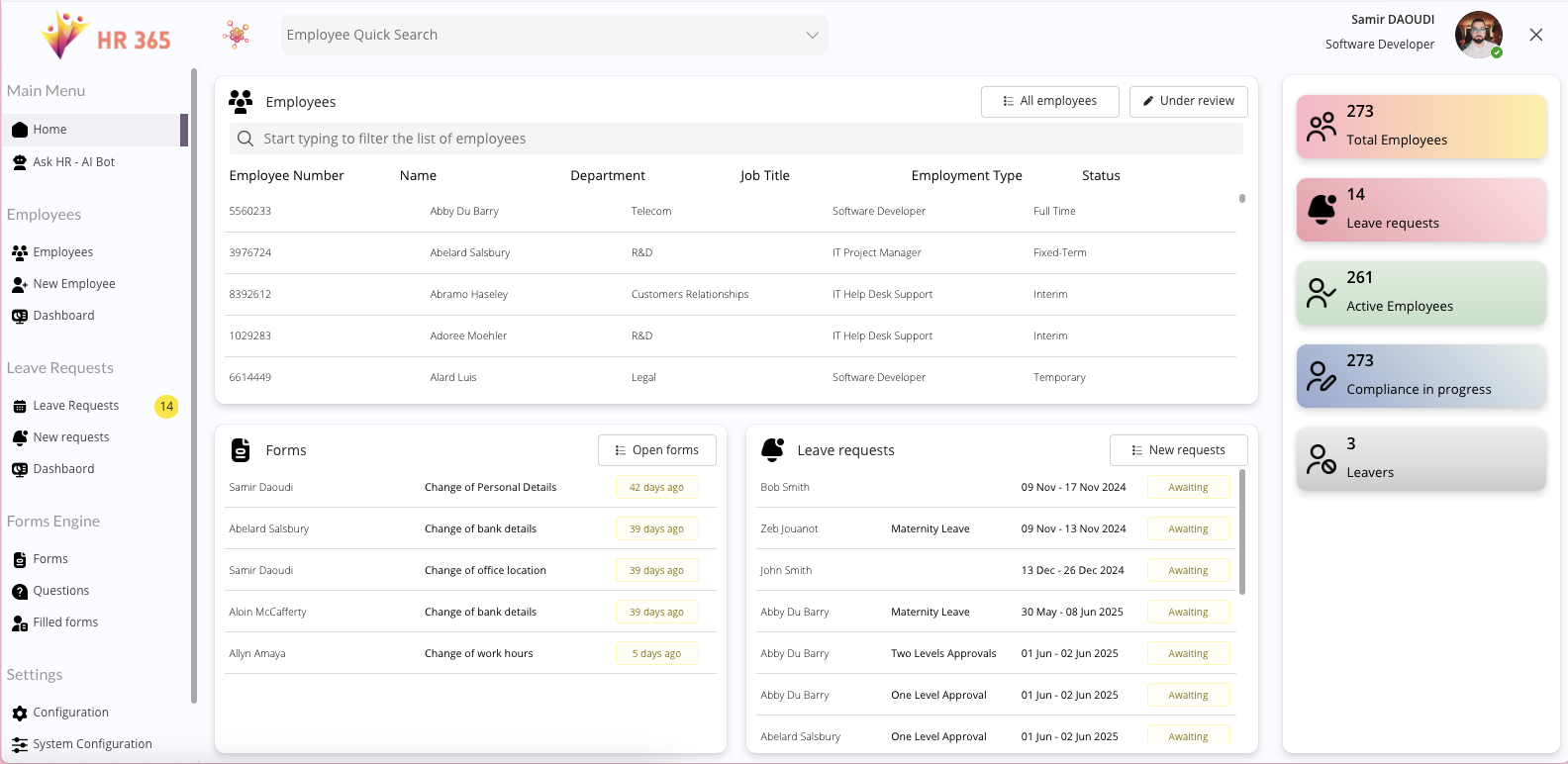
Real-Time HR Headcount Dashboard — Active, Inactive, and Organisational Breakdowns
The HR365 Employees Dashboard gives HR leaders an immediate, real-time view of the entire workforce — total headcount, active versus inactive status, and distribution across departments, job types, locations, and reporting levels — all in a single interactive interface inside Microsoft 365.
This is not a static report that refreshes overnight or requires a manual data pull. Because HR365 is built on Power Apps and Dataverse, the dashboard reflects the current state of your employee records at all times. When a new employee is created, their data appears in the dashboard immediately. When an employee’s status changes, the headcount figures update without any manual intervention.
For HR leaders preparing for a board meeting, a workforce planning review, or a compliance audit, this kind of instant visibility removes the preparation time that manual reporting creates. The answer to “how many employees do we have in the Manchester office right now?” is always a single click away — not a request to someone with spreadsheet access.
Interactive HR Analytics — Drill Into Roles, Seniority, and Reporting Lines
The HR365 dashboard goes beyond a static headcount summary. HR teams can interact directly with the data — drilling into specific departments, filtering by job type or employment status, and navigating through reporting lines to understand team structures at every level of the organisation.
Visual charts present the workforce by roles, seniority bands, and employment types in formats that are immediately readable without data literacy expertise. A hiring manager can understand the shape of their team at a glance. An HR director can see which departments are growing and which are contracting. A people analytics lead can identify patterns in employment type distribution that inform workforce strategy decisions.
All of this happens inside Microsoft 365, with no data leaving the platform and no requirement to export into a separate BI tool to create a chart that should have been available in the first place.
Operational HR Insights — Onboarding Progress, Equipment, Benefits, and Risk Indicators
The HR365 dashboard is not only an analytics tool — it is an operational control panel for HR teams managing a live workforce.
HR administrators can track onboarding progress across all active new hires at a glance — seeing which tasks are complete, which are pending, and which are overdue without navigating away from the dashboard. Equipment and asset status is visible per employee, making it straightforward to identify unresolved allocations or missing return confirmations. Benefits and allowance coverage is surfaced at the workforce level, allowing HR to spot eligibility gaps before they become employee relations issues.
Real-time indicators flag risks early — a cluster of overdue onboarding tasks, a department with high inactive employee counts, or a compliance document expiry approaching across a group of employees. These are the signals that get missed when HR data lives in disconnected systems and reporting happens quarterly. HR365 surfaces them continuously, inside the platform your team already operates in.
Native Microsoft Teams and Outlook Integration With Copilot-Ready HR Insights
HR365 delivers its analytics dashboard inside Microsoft Teams as a native application. There is no separate login, no browser tab to manage alongside Teams, and no application to install. HR administrators access the full dashboard from within Teams — the same environment they use for communication, task management, and collaboration — making the analytics a natural part of daily work rather than a separate reporting exercise.
Outlook notifications keep HR leaders informed when dashboard data requires attention — a significant change in active headcount, a compliance alert triggered by expiring documents, or an onboarding milestone overdue across multiple new hires. The notification layer works within your existing Microsoft 365 infrastructure without any additional configuration.
HR365 is also Copilot-ready. As Microsoft Copilot expands across Microsoft 365, HR365 is positioned to surface workforce insights through natural language queries — allowing HR leaders to ask questions about their data in plain language and receive dashboard-driven answers directly within Teams. Organisations that build their HR foundation on HR365 now are preparing for AI-powered people analytics as Copilot capabilities mature, without requiring a separate integration or additional licence.
Microsoft Viva workplace analytics research
HR365 Dashboard vs Power BI and Standalone HR Reporting Tools
Power BI is a powerful reporting platform, but it was not designed for HR self-service. Building an HR dashboard in Power BI requires data engineering expertise, an understanding of the HR data model, and ongoing maintenance as the organisation changes. For HR teams without a dedicated analyst, the result is often a dashboard that is set up once, becomes outdated within months, and gets abandoned in favour of the spreadsheet it was supposed to replace.
Standalone HR reporting tools solve some of these problems but introduce their own complexity — separate platforms, separate data syncs, and employee data that is copied outside the Microsoft 365 environment your organisation has already secured and governed.
HR365 is different because the dashboard is not built on top of HR data — it is built from it. The same Dataverse records that power employee creation, onboarding, asset management, and document storage also power the dashboard. There is nothing to sync, nothing to export, and nothing to configure separately. The analytics are simply a live view of the HR data that already exists inside your Microsoft 365 tenant.
Who the HR365 Dashboard Is Built For
The HR365 Employees Dashboard is designed for HR managers, People leads, and HR directors at organisations already operating on Microsoft 365 who need clear, real-time visibility into their workforce without investing in a separate analytics platform.
It is particularly suited to HR teams that are currently spending time every week compiling workforce reports from multiple sources — pulling headcount from one system, onboarding status from another, and asset records from a spreadsheet — before they can answer a basic question from a senior stakeholder. It is equally relevant to growing organisations where workforce complexity is increasing faster than HR capacity, and where having a live operational dashboard is the difference between proactive HR management and reactive firefighting.
If the answer to “what does our workforce look like right now?” currently requires a meeting, a data request, or a spreadsheet, the HR365 dashboard is built to change that.