HR365 - Human Resources Management Solution
TimeSheet 365 - Time recording Solution
FixIT 365 - IT Help Desk
LegalCase 365 - Legal Case Management Solution

Microsoft Power Platform Licensing in 2026: What You Actually Pay and Why It Matters

Microsoft Power Platform licensing is one of the most searched and least understood topics in the Microsoft ecosystem. The pricing page gives you numbers. The licensing guide gives you 60 pages of legalese. Neither tells you what you will actually spend or which plan makes sense for your situation.

This guide does. We break down every Power Platform licence as it stands in 2026, including the major change Microsoft made in January when they retired the Power Apps Per App plan. We cover what each product costs, what is included for free with Microsoft 365, where organisations overspend, and how to right-size your licensing before your next renewal.

If you are an IT decision-maker, a Power Platform administrator, or a consultant advising clients, this is the reference you will want to bookmark.

Logisam Microsoft Power Platform components including Power Apps, Power Automate, Power BI, Power Pages, Copilot Studio, and Dataverse

What Changed in January 2026

Before we walk through each product, you need to know about the single biggest licensing change since Microsoft restructured Power Platform pricing in 2021.

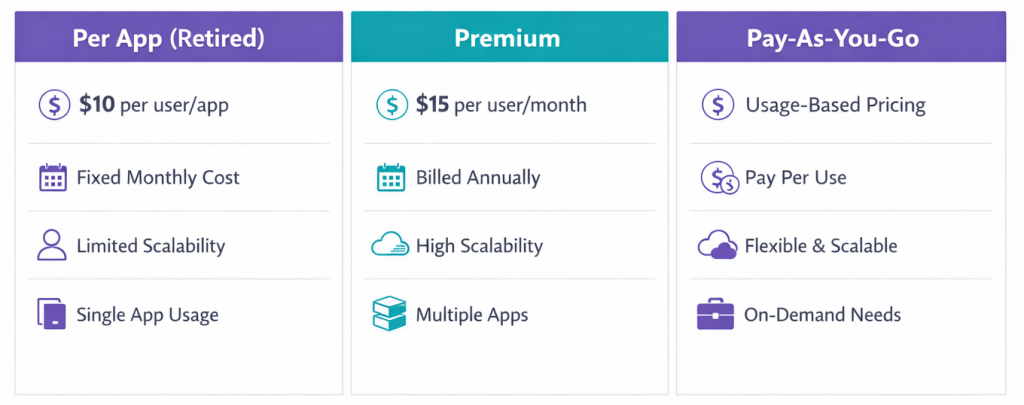
On 2 January 2026, Microsoft officially retired the Power Apps Per App plan ($5/user/app/month) from its price lists for new customers. This SKU had been the most affordable entry point for organisations that needed premium connectors or Dataverse access for just one or two apps.

Here is what this means depending on your buying channel:

Enterprise Agreement (EA) customers: You can continue using and renewing the Per App licence through your current agreement and beyond. Changes are reconciled through the annual true-up process.

CSP (Cloud Solution Provider) customers: You are not affected. Microsoft confirmed in March 2026 that CSP customers can continue to purchase, use, and renew Per App subscriptions.

MPSA customers: The SKU is no longer available. Your current agreement remains active, but once it ends, you have a 60-day window to migrate to an alternative.

New customers (non-CSP): The Per App plan is no longer available to you. Your options are now Power Apps Premium ($20/user/month) or Pay-As-You-Go ($10/user/app/month, metered).

This matters because organisations that were licensing 50 users at $5 per app ($250/month) now face either $1,000/month on Premium or $500/month on Pay-As-You-Go for the same access. That is a 100% to 300% increase depending on the path you choose.


Power Apps licensing comparison between retired Per App plan, Premium plan, and Pay-As-You-Go pricing in 2026

Power Apps Licensing

Power Apps is the low-code application development platform within Power Platform. It allows organisations to build custom business applications using canvas apps, model-driven apps, and Power Pages.

Power Apps Premium (formerly Per User Plan) $20/user/month. This gives a single user unlimited access to all Power Apps within the tenant, including apps that use premium connectors, custom connectors, and Dataverse. This is now the default licence for any serious Power Apps deployment.

Power Apps Pay-As-You-Go $10/active user/app/month, metered through an Azure subscription. You only pay when a user actually runs an app in a given month. This is the replacement path for organisations that previously relied on the Per App plan. It works well when usage is unpredictable or when you have a large number of users who access apps infrequently.

Power Apps included with Microsoft 365 If your organisation has Microsoft 365 E3, E5, Business Basic, or Business Premium licences, your users already have access to Power Apps with standard connectors (SharePoint, Excel, Microsoft 365 data). They cannot use premium connectors, Dataverse, or custom connectors without a standalone Power Apps licence.

This is the most common point of confusion. Many organisations assume their Microsoft 365 licence covers all Power Apps functionality. It does not. The moment an app connects to Dataverse, SQL Server, or any premium connector, every user of that app needs a Power Apps Premium or Pay-As-You-Go licence.

Power Automate Licensing

Power Automate is the workflow automation engine of Power Platform. It handles cloud-based automation, scheduled workflows, and robotic process automation (RPA).

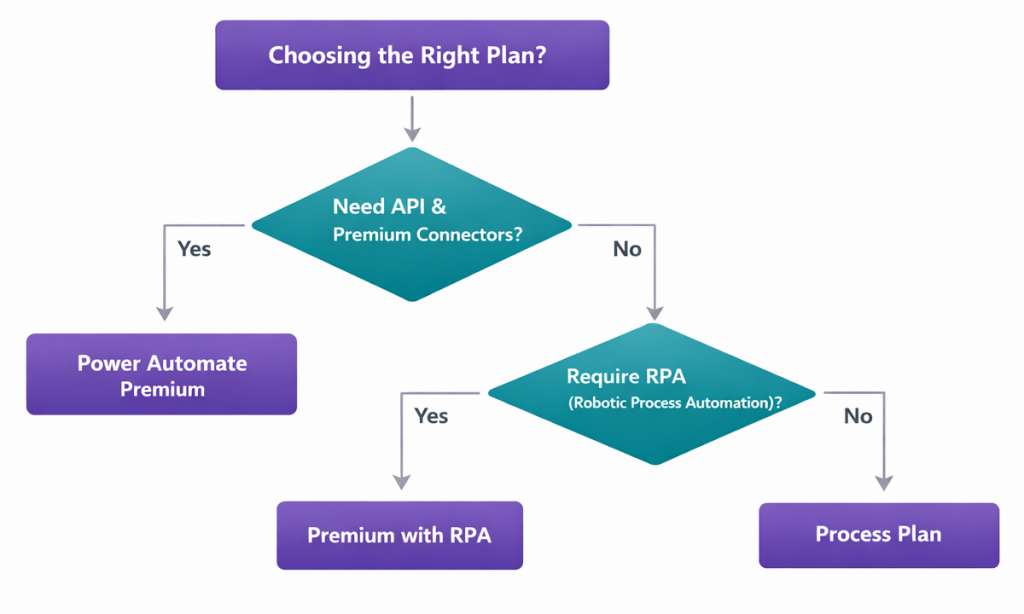
Power Automate Premium (Per User) $15/user/month. Unlimited cloud flows for an individual user, plus 5,000 AI Builder credits and access to Process Mining desktop capabilities.

Power Automate Premium with Attended RPA $40/user/month. Everything in the Premium plan, plus the ability to run attended desktop flows using robotic process automation. This is for scenarios where a user triggers an automation on their local machine, such as extracting data from a legacy desktop application.

Decision flowchart for choosing the right Power Automate licensing plan

Power Automate Process (Per Flow) $100/flow/month. This licences a single flow that can serve an unlimited number of users within the organisation. It is ideal for organisation-wide automations like automated onboarding sequences, company-wide approval chains, or scheduled data synchronisations that are not tied to one person.

Power Automate included with Microsoft 365 Microsoft 365 licences include basic Power Automate cloud flows using standard connectors. The same restriction applies as with Power Apps: the moment a flow uses a premium connector, Dataverse, or RPA, it requires a standalone licence.

Power BI Licensing

Power BI is the data visualisation and business intelligence layer of Power Platform.

Power BI Free No cost. Personal data visualisation only. You can create reports and dashboards for your own use, but you cannot share them with others or collaborate.

Power BI Pro $10/user/month. This is the standard collaboration licence. Users can share dashboards, co-author reports, and access shared workspaces. Most organisations that use Power BI for team-level reporting need Pro licences for every user who views or interacts with shared content.

Power BI Premium Per User (PPU) $20/user/month. Everything in Pro, plus advanced features including AI-driven insights, paginated reports, larger dataset sizes, and higher refresh rates. PPU is positioned for power users and data analysts who need enterprise-grade capabilities without the cost of full Premium capacity.

Power BI Premium Per Capacity Starts at $4,995/capacity/month. This is the enterprise tier. It provides dedicated cloud compute resources and allows unlimited viewers without individual Pro licences. Organisations with hundreds of report consumers typically move to Premium Per Capacity to reduce per-user licensing costs.

Power BI Embedded For ISVs and application developers who want to embed Power BI visuals into their own products. Pricing is based on capacity nodes.

Power Pages Licensing

Power Pages is the platform for building secure, external-facing websites connected to Dataverse data, such as customer portals, vendor onboarding sites, and partner self-service systems.

Authenticated Users $200 per 100 users/month. For portals where users log in with verified credentials.

Anonymous Users $75 per 500 users/month. For public-facing pages where visitors do not need to authenticate.

Power Pages licensing is based on the number of unique users who access the site within a month, not the number of pages or sessions.

Copilot Studio Licensing

Copilot Studio (formerly Power Virtual Agents) is for building AI-powered chatbots and copilots that interact with users, retrieve data, and trigger workflows.

Copilot Studio $200/tenant/month. This provides 25,000 messages per month across all bots in the tenant. Additional messages can be purchased as add-ons.

This is a tenant-level licence, not per user. One licence covers all chatbots and copilots deployed across your organisation, regardless of how many users interact with them.

Dataverse Storage Pricing

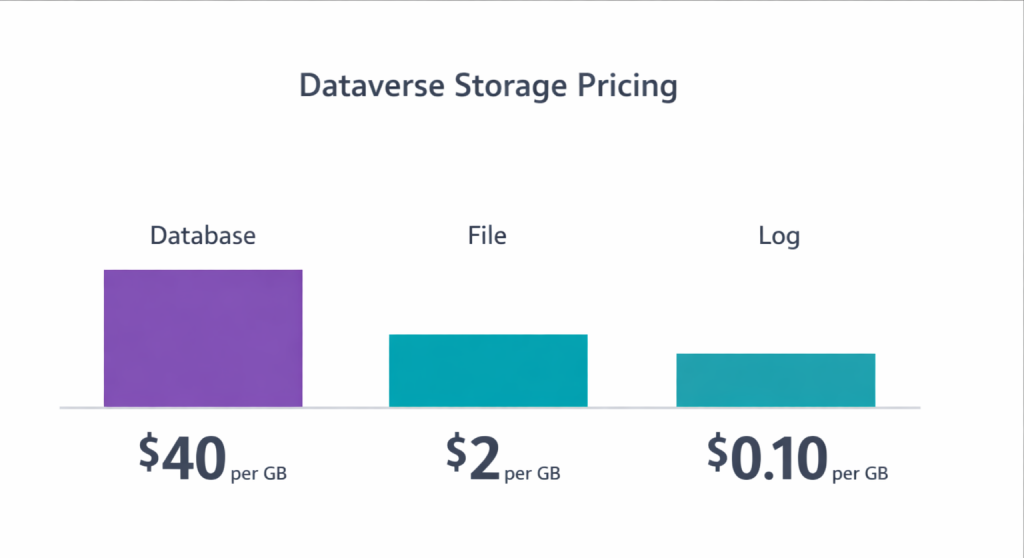
Dataverse is the data platform that underpins Power Apps, Power Automate, Power Pages, and Copilot Studio. Storage is included with most Power Platform licences, but organisations with large datasets often need additional capacity.

Database Capacity: $40/GB/month File Capacity: $2/GB/month Log Capacity: $10/GB/month

Every tenant receives a base allocation of Dataverse capacity with their first Power Platform licence. Additional capacity accrues with each additional licence purchased.

Dataverse storage pricing breakdown showing database, file, and log capacity costs

AI Builder Credits

AI Builder adds artificial intelligence capabilities to Power Apps and Power Automate, including form processing, object detection, text classification, and prediction models.

AI Builder credits are included with Power Apps Premium (5,000 credits/user/month) and Power Automate Premium (5,000 credits/user/month). Additional credits can be purchased as an add-on at $500 per 1 million service credits/month.

Important note: Microsoft has announced that the complimentary 5,000 AI Builder credits currently included with certain licences will be removed on 1 November 2026. Plan your AI Builder usage and budget accordingly.

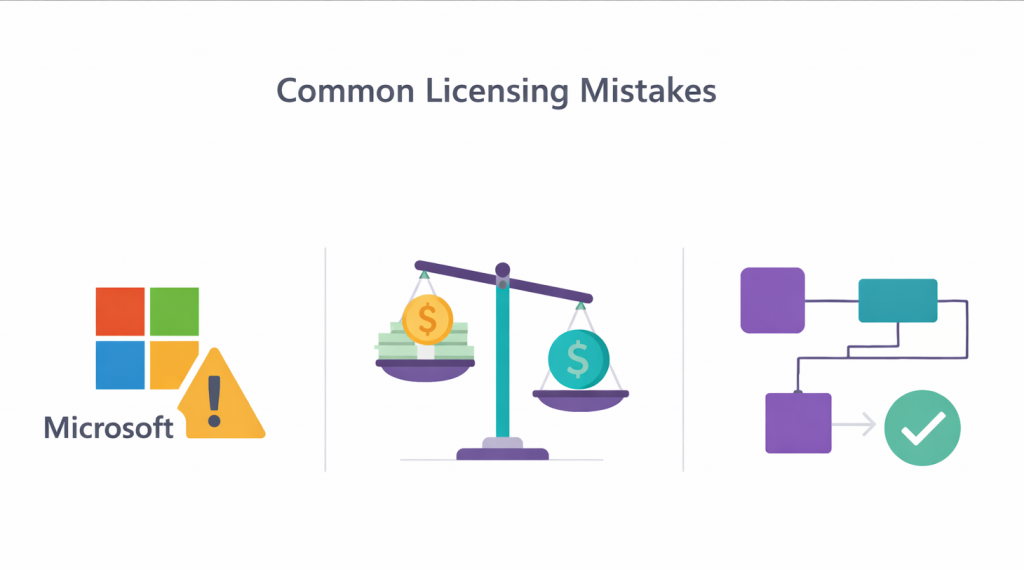
The Three Most Common Licensing Mistakes

After years of advising organisations on Power Platform licensing, these are the three errors we see most frequently:

1. Assuming Microsoft 365 covers everything. It does not. Microsoft 365 includes Power Apps and Power Automate with standard connectors only. Any app or flow using premium connectors, Dataverse, custom connectors, or on-premises gateways requires a standalone licence. This catches organisations off guard when they build an app on SharePoint (standard) and later add a Dataverse table (premium).

Three most common Power Platform licensing mistakes organisations make

2. Over-licensing with Premium when Pay-As-You-Go would cost less. If you have 200 employees but only 40 of them use a Power App regularly, licensing all 200 at $20/month ($4,000/month) is significantly more expensive than Pay-As-You-Go at $10/active user/app/month. Run the maths on your actual active user count before committing to Premium.

3. Ignoring the Per Flow option for shared automations. Organisations often licence 50 users at $15/month ($750/month) for a single company-wide approval flow, when a single Per Flow licence at $100/month would cover the same scenario for unlimited users.

Real-World Cost Scenarios

Scenario 1: Small team, one app A 25-person department needs one Power App connected to Dataverse for tracking equipment requests. Option A: Power Apps Premium = 25 x $20 = $500/month Option B: Pay-As-You-Go (if ~15 are active monthly) = 15 x $10 = $150/month Recommendation: Pay-As-You-Go saves $350/month.

Scenario 2: Organisation-wide leave approval flow A 300-employee company wants a Power Automate flow for leave approvals using Dataverse. Option A: Power Automate Premium for all 300 = 300 x $15 = $4,500/month Option B: Per Flow plan = $100/month Recommendation: Per Flow saves $4,400/month.

Scenario 3: Full Power Platform deployment A 100-person company deploying 5 Power Apps, 3 Power Automate flows, and Power BI dashboards. Estimated cost: 100 x $20 (Power Apps Premium) + 3 x $100 (Per Flow for shared flows) + 100 x $10 (Power BI Pro) = $3,300/month With Power BI Premium Per User instead: 100 x $20 + $300 + 100 x $20 = $4,300/month but with advanced analytics.

How to Audit Your Current Power Platform Licensing

Before your next renewal, run this quick check:

  1. Open the Power Platform Admin Centre and navigate to the Capacity tab under Resources. Review your Dataverse storage allocation versus actual usage.
  2. Check your active user counts. If fewer than 60% of licensed users are actively using apps or flows each month, you are likely over-licensed.
  3. Identify shared flows that could be moved from per-user licences to Per Flow licences.
  4. Review any apps still using the retired Per App plan and determine whether Premium or Pay-As-You-Go is more cost-effective for each.
  5. If you use AI Builder, calculate your monthly credit consumption and plan for the November 2026 change.

If you need help with a licensing review, LogiSam offers a free consultation for organisations looking to optimise their Power Platform investment. We assess your current setup, identify where you are overspending, and recommend the most cost-effective licensing structure for your actual usage.

Book a Free Licensing Consultation

FAQs

What Power Platform features are free with Microsoft 365?

Microsoft 365 licences (E1, E3, E5, Business Basic/Standard/Premium) include Power Apps and Power Automate with standard connectors like SharePoint, Excel, and Outlook. You can build and run apps and flows that only connect to these data sources without any additional licence. The moment you use a premium connector, Dataverse, or a custom connector, a standalone licence is required.

Is the Power Apps Per App plan still available?

As of January 2026, the Per App SKU ($5/user/app/month) is no longer available for new customers, except through the CSP channel. Existing EA customers can continue using and renewing it. MPSA customers will lose access after their current agreement ends. The recommended alternatives are Power Apps Premium ($20/user/month) or Pay-As-You-Go ($10/active user/app/month).

Do I need a Power BI licence to view reports?

If reports are shared through Power BI Pro workspaces, every viewer needs at least a Pro licence ($10/month). If your organisation has Power BI Premium Per Capacity, viewers can access shared reports without individual Pro licences. Power BI Free only allows personal, unshared use.

How does Power Automate Per Flow licensing work?

  1. The Per Flow plan costs $100/flow/month and allows unlimited users to trigger or run that specific flow. It is ideal for company-wide processes like approvals, notifications, or data synchronisation. You cannot use one Per Flow licence to cover multiple flows. Each flow needs its own licence.

What happens to AI Builder credits after November 2026?

Microsoft has announced that the complimentary 5,000 AI Builder credits included with Power Apps Premium and Power Automate Premium will be removed on 1 November 2026. After that date, organisations that use AI Builder features will need to purchase credit add-ons separately.

Can I mix different licence types in one organisation?

Yes. You can assign Power Apps Premium to heavy users and use Pay-As-You-Go for occasional users. You can also mix Power Automate Premium (per user) with Per Flow licences for shared workflows. The key is to audit your actual usage patterns before deciding.

LogiSam Power Platform licensing consultation

Book A Free Consultation

How can we help you ?